Chain

Supply chain tied to the software operating layer.

Describe what you need in plain language, by voice, text or typed note, and it comes back as a structured vendor, purchase or transfer record. You review it before anything saves.

What it does

A batch of parts gets bought while a hundred of the same sit on a shelf two projects over, tying up cash. When the part is not there on time, the job waits on it. Someone searches internal systems across other projects or the fleet to find what is already on hand, and the parts ceremony is heavy enough that it funnels to one person who becomes the parts desk.

Chain is the supply chain and vendor management application inside OpCor. A part requested from the work order becomes a purchase request. Stock across every location is looked up by name, by voice or text, and an administrator sees another project's surplus above its reserve in the Reorder tab before a purchase is suggested. Transfers move inventory between locations. The RFQ and purchase orders follow. Every record is a draft for review before it saves.

Vendors are onboarded, kept current and on track in one place. Where a vendor stands is found by a verbal search, by voice or text, through the assistant.

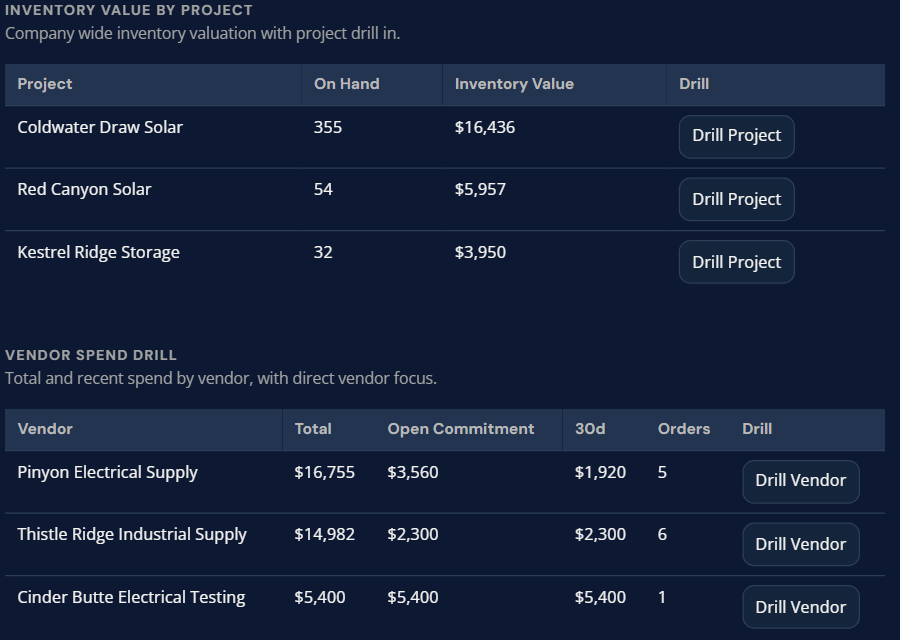
A dashboard shows inventory value by project and spend by vendor, with drill-down buttons for each.

How it works

  1. 01

    Onboard a vendor

    Enter vendor details or describe the supplier in plain language. Review the structured vendor record before saving.

  2. 02

    Create a purchase request

    Describe what you need and why. Review and submit for approval.

  3. 03

    Manage purchase orders

    Approved requests convert to purchase orders, run through an RFQ where needed. Send to vendors, track status changes, edit or cancel with a reason.

  4. 04

    Receive deliveries

    Record full or partial receipts at the line level. Inspection outcome and rejected quantity are entered by hand, and every receipt posts to inventory with an audit trail.

  5. 05

    Control inventory

    Maintain item master records, track stock positions across locations, with items and locations looked up by name, by voice or text, through the assistant, and make quantity adjustments with a reason.

  6. 06

    Check for surplus before buying

    An admin can review another project's surplus above its reserve and propose a transfer before a purchase is suggested.

Use cases

Parts request from the field (renewables O&M)

A Technician on a wind turbine discovers a worn bearing during a scheduled inspection. Through their work order in Flow, they describe the part needed. Chain turns the description into a purchase request and routes it for approval. The Technician never leaves the work order.

Vendor onboarding (utilities)

A utility contractor needs to onboard new material suppliers for a substation upgrade project. Instead of filling out identical forms for each vendor, the procurement lead enters each supplier in plain language and reviews the structured vendor record before saving.

Inventory transfers across projects (construction)

A general contractor manages materials across several active construction projects. When one project has surplus steel, an admin reviews it in the Reorder tab and proposes moving it to the project that needs it before a purchase is suggested.

Demand forecasting (industrial maintenance)

An industrial maintenance company supporting multiple manufacturing plants needs to plan consumables, including filters, lubricants and PPE, for the next quarter. The operations manager creates a forecast plan with line-level quantity decisions that route through approval before triggering purchase requests.

AI capabilities

Vendor, purchase request and transfer creation

Each is created as a draft for your review before it saves.

Purchase request intake

Describe what you need and why in plain language. The request is created for approval routing.

Vendor record normalization

Describe a supplier in plain language and the details are structured into a vendor record for your review.

Surplus-first recommendations

An admin can review another project's surplus above its reserve, proposed before a purchase, on demand in the Reorder tab.

Lookup by voice or text

Items, locations and vendors are found by name through the assistant, spoken or typed.

Operational dashboard

Spending, inventory health and summary reports with drill-down by project, vendor, category and date range.

Value and integration

What you gain

  • ▸Field teams submit purchase requests in plain language without learning procurement formats.
  • ▸Every receipt posts to inventory with an audit trail.
  • ▸Quantity adjustments carry a reason, and PO cancellations carry a coded reason.
  • ▸An admin can see another project's surplus before a purchase is suggested.

How Chain connects to OpCor

  • ▸Flow: Purchase requests tie to the work order that needs the part, so Technicians submit a parts need without leaving the job.
  • ▸Perform: Approved Perform recommendations that target supply chain show as a badge in Chain.

See Chain running

Tell us what you want to see in Chain and pick a time that works for you. On the call we listen to your questions, then show you OpCor running on what you picked.