Utility field service dispatcher
Receives an emergency transformer repair call and speaks the job details into Flow. Assignment checks the Technician against the certifications the job carries and flags anything missing.
Scheduling and work order execution.
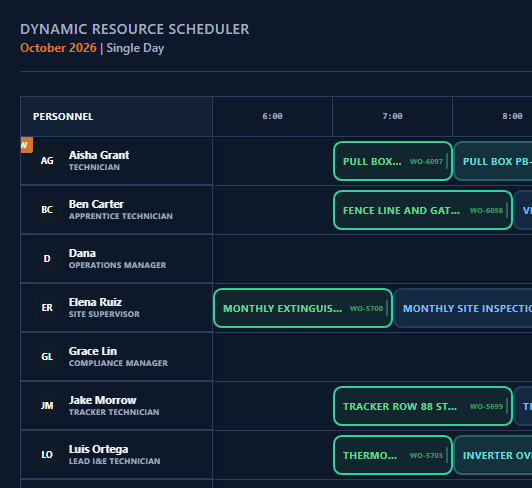
Create work orders by voice or by typing. Assignment checks skills and certifications and flags a missing one, and the schedule shows worker lanes, work blocks, time off, and the backlog pool.
The schedule says one thing, the day says another. A callout, a late part, a lapsed certification, and the plan breaks, and the time to re-stitch it by phone falls to schedulers, supervisors, and the whole operation, not only the Technician. Flow is where scheduled work happens. Create a work order by voice or by typing: typed creation drafts skills, certifications, and an event group for you to review, and voice creation captures title, asset, project, priority, and timing.
Work starts once a procedure is approved and the assigned people have acknowledged the approved artifacts that exist, a safety briefing among them where one exists. Assignment checks skills and certifications and flags a missing one. Closeout stays blocked while the safety briefing is unacknowledged, a procedure step is incomplete, or a blocker is open. One click builds the Plan of Day, End of Day, or monthly roll-up from the work orders and findings already logged on the project.
Describe the job by voice or by typing. Typing drafts skill requirements, certifications, and an event group for you to review; voice captures title, asset, project, priority, and timing.
Attach a procedure from Library, run AI Auto-Locate, or generate an AI procedure draft. Accept the proposal or start blank.
Where an approved procedure or safety artifact exists, the assigned owner and participants acknowledge it before execution proceeds.
Work through the order's steps, capturing notes and findings as you go.
Close stays blocked until the safety briefing is acknowledged, procedure steps are complete, and blockers are cleared.
Build a Plan of Day, End of Day, or monthly roll-up with one click from the project's logged work orders.
Receives an emergency transformer repair call and speaks the job details into Flow. Assignment checks the Technician against the certifications the job carries and flags anything missing.
Manages a scheduled inverter replacement across a wind farm. The Work Queue surfaces orders sitting untouched for 24 hours or more, and dependency chains between work orders clear automatically as each one closes.
Builds a Plan of Day report with one click. The report pulls every work order for the project, with asset, owner, status, and the Technician's logged findings.
Tracks work across active projects on the Schedule tab's worker lanes and backlog pool. When an assigned worker's plan changes, their later orders shift down the lane automatically.
Describe the job by typing, and AI drafts skill requirements, certifications, and an event group for you to review and confirm.
Speak the job and the assistant asks for the asset, then captures title, project, priority, and timing once you confirm.
At creation, OpCor proposes a matching approved form template as the procedure. Accept it or start blank.
Where no procedure exists, generate an AI draft for admin review and approval.
Where no approved safety artifact exists, generate an AI draft that routes through admin approval.
Skill, double-booking, and procedure or safety warnings are flagged as advisories.
An optional AI step structures your resolution note into a filed Library document.
Plan of Day, End of Day, and monthly roll-up, each one click, built from the work orders and findings already logged.
Capture what's real. Forecast what's possible.
AI task boards from text or files.
Upload, type, or dictate. AI builds the form.
Documents of record.
Evidence linked to requirements.
Supply chain tied to the software operating layer.
Narrated analysis from your own data.
Contract and KPI tracking from your own documents.
Tell us what you want to see in Flow and pick a time that works for you. On the call we listen to your questions, then show you OpCor running on what you picked.