Forms

Upload, type, or dictate. AI builds the form.

Upload an old inspection PDF or describe what you need to capture, and get back a digital form template your team reviews, edits, and publishes.

What it does

Paper forms, inconsistent logs, and hand-keyed data are where compliance gaps start. Forms turns your existing paper forms, PDFs, spreadsheets, and typed descriptions into structured digital form templates your team fills out on phones, tablets, or desktops. Forms does not just collect what someone types at capture time. It proposes the form template itself from your source material: an old inspection PDF, a spreadsheet, or a typed description of what needs capturing. The template arrives as a draft. An administrator reviews it field by field and edits before publishing. Submissions then route through a governed lifecycle: draft, submit, approve, reject, unlock, and an approved entry files into Library as a document of record.

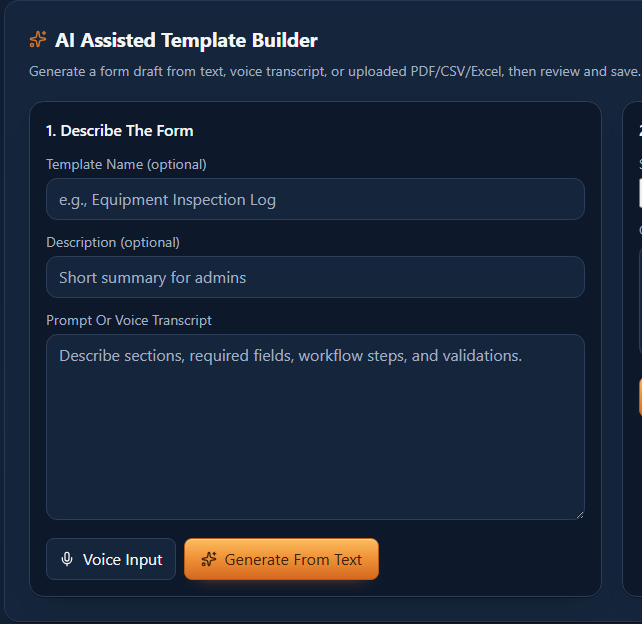
A form template takes a name, description and a typed or spoken prompt, with a button to generate it.

How it works

  1. 01

    Start in the Builder

    Upload an existing inspection PDF, drop in a spreadsheet, or type what the form should capture.

  2. 02

    AI proposes a template

    AI proposes field names, types, required flags, placeholder text, and options drawn from your source material. You review and edit in the Builder before publishing.

  3. 03

    Review field by field

    Review the proposed template in the field-by-field editor. Rename fields, adjust the required flag, reorder fields, or add new ones.

  4. 04

    Publish and assign

    Publish the template and assign it to specific projects or company-wide.

  5. 05

    Fill out in the field

    Technicians browse available forms, select the right one, and fill it out.

  6. 06

    Route for approval

    Completed submissions route to an admin for approval. Approved entries file into Library as documents of record.

Use cases

Industrial maintenance supervisor

Has a stack of old paper inspection sheets for rotating equipment. Scans them to PDF and uploads into Forms. AI proposes a digital template matching each sheet's fields. Supervisor reviews, adjusts field types for numerical readings, and publishes.

Water treatment compliance officer

Receives updated sampling requirements from a state regulator as a spreadsheet. Drops it into Forms. AI reads the column headers and proposes a field for each column. Officer reviews, assigns it to all plant projects, and the team has a digital form ready for the next sampling cycle.

Construction quality inspector

Needs to create a concrete pour inspection form for a new project. Types a list of what needs capturing: batch ticket numbers, slump test results, cylinder counts, weather conditions, placement locations. AI proposes a structured form with appropriate field types. Inspector reviews and publishes.

AI capabilities

Template generation from source material

PDF, CSV, spreadsheet, or typed text. AI proposes a complete form template from whatever you provide. This is form creation, not just form filling. AI generates the draft. You review and publish.

The template as a proposal

Every AI-generated template is a proposal. You review it field by field in the Builder before publishing.

Governed lifecycle

Every submission follows a controlled path: draft, submit, approve, reject, unlock. Approved entries file into Library as documents of record.

In-application AI assistant

Ask questions about template structure or request summaries of recent submissions. Operates within your role and permission level.

Value and integration

What you gain

  • ▸An old paper inspection sheet becomes a reviewable digital form template instead of a manual rebuild from scratch.
  • ▸Approved entries file into Library as documents of record, with the approver and timestamp visible in the queue.
  • ▸A spreadsheet of requirements becomes a field-by-field template proposal instead of a form built by hand, column by column.

How Forms connects to OpCor

  • ▸Flow: When a work order is created, OpCor proposes the matching approved form as its procedure.
  • ▸Library: Approved submissions archive to Library as a document of record.
  • ▸Comply: An approved form entry routes as evidence to the compliance requirements it maps to, automatically.

See Forms running

Tell us what you want to see in Forms and pick a time that works for you. On the call we listen to your questions, then show you OpCor running on what you picked.