Perform

Contract and KPI tracking from your own documents.

Upload a contract or specification and AI extracts candidate metrics, targets and threshold bands for your review. Approve the configuration and your dashboard starts tracking recorded readings against it.

What it does

What you owe, uptime, response time, quality, is written down once and re-read after the breach. Perform is the application for operations leaders who need a configured set of metrics, targets and thresholds to track contract and service commitments. Upload a contract PDF, specification or data file, and AI reads the document and proposes a set of metrics, targets and threshold bands for your review.

Once you approve the configuration, Perform becomes the dashboard where you track metric readings against targets and thresholds, and an approved Perform recommendation appears as an advisory item in the application it targets.

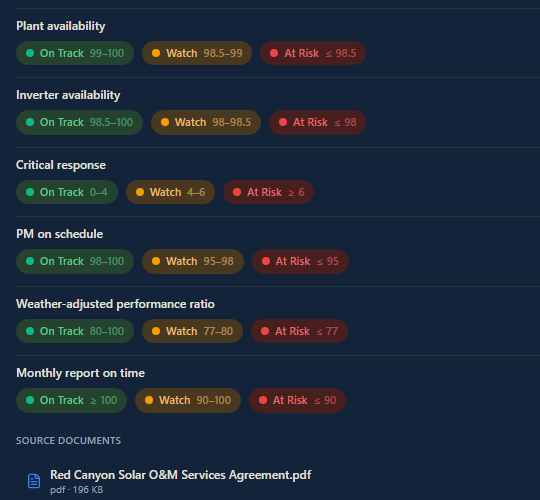
A contract's tracked metrics, including availability and response time, each show on-track, watch and at-risk ranges.

How it works

  1. 01

    Upload a document

    Drop in a contract, specification or data file. AI reads it and proposes a set of metrics, targets and threshold bands.

  2. 02

    Review the proposal

    See the counts, the source summary and confidence notes before you apply the extracted configuration.

  3. 03

    Apply the configuration

    Approve to create the metric configuration. Readings and recommendations are tracked against it from that point.

  4. 04

    Monitor the dashboard

    See configured metrics, target coverage and open recommendations.

  5. 05

    Run a forecast

    An admin can run a forecast on a recorded metric's history and generate a narrated read.

  6. 06

    Act on a recommendation

    Approve, reject or acknowledge an AI recommendation. An approved recommendation appears as an advisory item in the application it targets.

Use cases

Contract compliance monitoring (utilities)

A regional water utility manages several service contracts with different KPI structures. Perform extracts the KPI targets and thresholds from each contract PDF and builds a dashboard the operations director reviews for metrics approaching a threshold.

Portfolio performance tracking (renewables)

A solar O&M provider tracks availability and production ratio across many projects. Perform holds the configured metrics, targets and thresholds, and the manager reviews readings on the dashboard as they come in.

Planned versus actual tracking (industrial maintenance)

A plant maintenance contractor sets specific turnaround timelines and cost targets per project. Perform holds the targets alongside recorded readings so the project lead can review them on the dashboard.

Forecast review (construction and field service)

A specialty contractor records delivery metrics over time. An admin runs the Forecast view on a metric's history and reviews the narrated projection before deciding on next steps.

AI capabilities

Contract extraction

Upload a PDF or Word document. AI identifies candidate metrics, targets and threshold bands. You see counts and confidence notes, then apply or discard the proposal.

Conversational configuration

Describe what you want to track in plain language and a metric configuration is created.

Forecast on a metric

An admin runs a forecast on one metric's recorded history and gets a narrated projection back.

Recommendation review

Review an AI recommendation drawn from a single metric's forecast, targets and thresholds. Approve, reject or acknowledge it.

Strategic Objectives

Describe an objective and AI proposes a plan. Each action in the plan runs through the owning application's own route under your permissions when you execute it.

Value and integration

What you gain

  • ▸Metrics, targets and thresholds come from your own contract or spec instead of a blank configuration screen.
  • ▸Recommendations appear as advisory items in the applications they target, so they are visible where the work happens.
  • ▸A single dashboard holds configured metrics and open recommendations together.

How Perform connects to OpCor

  • ▸Flow: An approved recommendation that targets Flow appears there as an advisory item.
  • ▸Chain: An approved recommendation that targets supply chain appears there as an advisory item.
  • ▸Reports & Analytics: Perform's Forecast view runs on the same shared analytics engine that powers Reports & Analytics.

See Perform running

Tell us what you want to see in Perform and pick a time that works for you. On the call we listen to your questions, then show you OpCor running on what you picked.