Comply

Evidence linked to requirements.

Set up the requirements your operation must meet, each one with its connectors and what it maps to, and evidence from Forms, Library, or a direct upload routes to it, and to its location, automatically. Track coverage and overdue requirements on a dashboard that updates each time you open it.

What it does

When the auditor, the customer, or the lawyer says show me, the proof is real but scattered across forms, drives, and inboxes, and you over-prepare and still look less organized than you are. Comply is where everybody gets on the same page and stays on track. Define a requirement by typing or by voice, with a standard reference, cadence, and priority, and set it up once with its connectors and what each one maps to. From there, evidence routes to it, and to its location, automatically.

The dashboard calculates coverage each time you open it: the share of requirements with at least one linked evidence record, and which ones are overdue. Run an audit against a period and a scope, and the result is scored and filed as a draft package. Route it through submit, authorize, or reject, back to draft, and every step and every link stays logged.

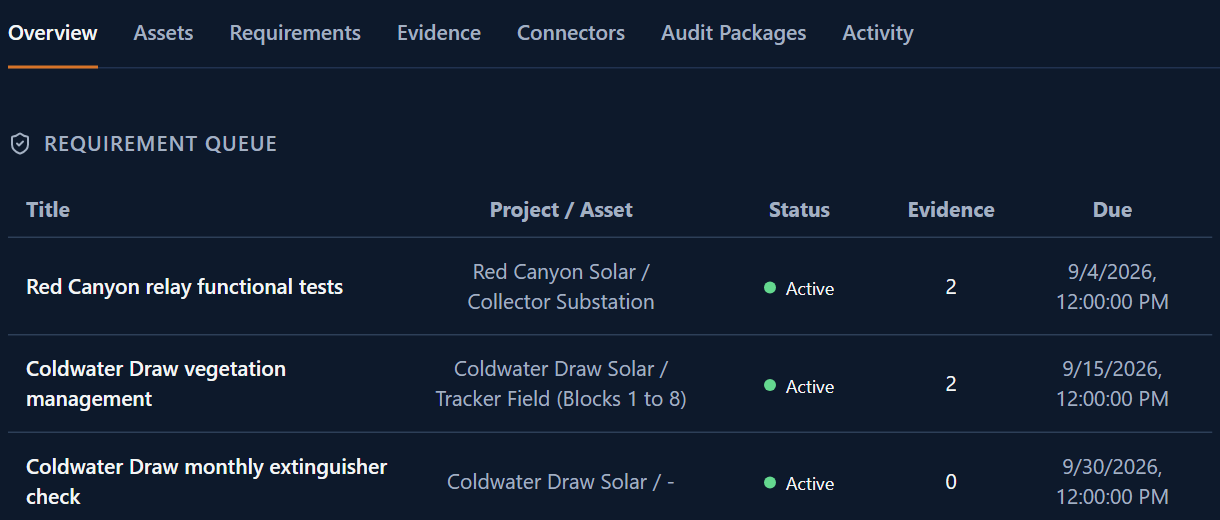
A queue lists compliance requirements with their project, asset, status, linked evidence and due date.

How it works

  1. 01

    Define your requirements

    Type or speak the standard, cadence, and priority. A typed entry saves immediately; a spoken one is held for your confirmation.

  2. 02

    Set up your connectors

    Set each requirement up once, with its connectors and what each one maps to.

  3. 03

    Evidence routes automatically

    Approved Forms entries, Library documents, uploads and connector feeds route to their requirements, and to their location, on their own.

  4. 04

    Check your dashboard

    Coverage and overdue requirements are calculated live, each time you open the page.

  5. 05

    Run an audit

    Score a period, a scope, a project, and an asset. The result files as a draft package with a coverage percentage and a summary.

  6. 06

    Route for approval

    Submit the draft, then authorize or reject it. A rejected package returns to draft.

Use cases

Annual regulatory audit preparation (water and wastewater)

A water treatment facility faces annual state compliance audits. The compliance manager sets up each requirement once, with its connectors to approved Forms entries and Library documents, instead of pulling files from cabinets and shared drives when the audit date arrives.

ISO process documentation (industrial maintenance)

An industrial services company pursuing ISO 9001 certification sets up each requirement to map to governed SOPs from Library, originally published through COR, building a requirement-to-evidence record as the work happens.

Vendor compliance verification (utilities)

A utility company tracks subcontractor certifications and insurance records as requirements, each one set up to map to vendor documents as evidence, and checks the dashboard for what is still outstanding.

Multi-project safety compliance (construction)

A general contractor running several active projects defines its OSHA requirements once, maps them by project, and checks the dashboard for which requirements are still uncovered.

AI capabilities

Requirement creation from natural language

Type or say what the requirement covers, with a cadence and a priority. A typed entry saves immediately as active.

Live coverage dashboard

Coverage percentage and overdue requirements calculate from your linked evidence each time the page loads.

Audit scoring

Run an audit against a period and scope, and the result is scored with a coverage percentage and a short summary before you review it.

AI-assisted document extraction

Upload a regulatory PDF, contract, SOP, or policy, and AI proposes requirements, evidence links, and package scaffolds for your review before anything saves.

Value and integration

What you gain

  • ▸Requirements and their linked evidence sit in one place, instead of across forms, drives, and inboxes.
  • ▸Coverage and overdue requirements calculate live, each time you check the dashboard.
  • ▸Every evidence link, every requirement, and every audit package stays logged and traceable.
  • ▸An uploaded regulatory document can become a draft set of requirements and evidence links for your review.

How Comply connects to OpCor

  • ▸Forms: An approved Forms entry routes to the requirements it maps to as evidence, automatically.
  • ▸Library: A Library document routes to the requirements it maps to as evidence the same way, and an authorized Comply package files to Library.
  • ▸Flow: Flow's AI finalization document, once filed to Library, routes as evidence too.

See Comply running

Tell us what you want to see in Comply and pick a time that works for you. On the call we listen to your questions, then show you OpCor running on what you picked.